
MindE FluxKomprimator
1. Introduction & Concept
The FluxKomprimator is based on the principle of micro modulation. Instead of leaving a sound static, the plugin ensures that parameters constantly change subtly (or drastically). The goal is to create a loop that feels like it's "surfing a wave" – always in motion, but rhythmically anchored.
Core Features
-
Flux Core Engine: An internal chaos LFO that runs completely independently of the DAW. It breathes organic life into every module – without you having to draw a single automation line.
-
Modular Architecture: 5 independent effect modules (Stutter, Grit, Filter, Space, Joker) that can be arranged in any order.
-
Visual feedback: A dynamic turbine visualizes the "flux" and level in real time.
2. The user interface (GUI)
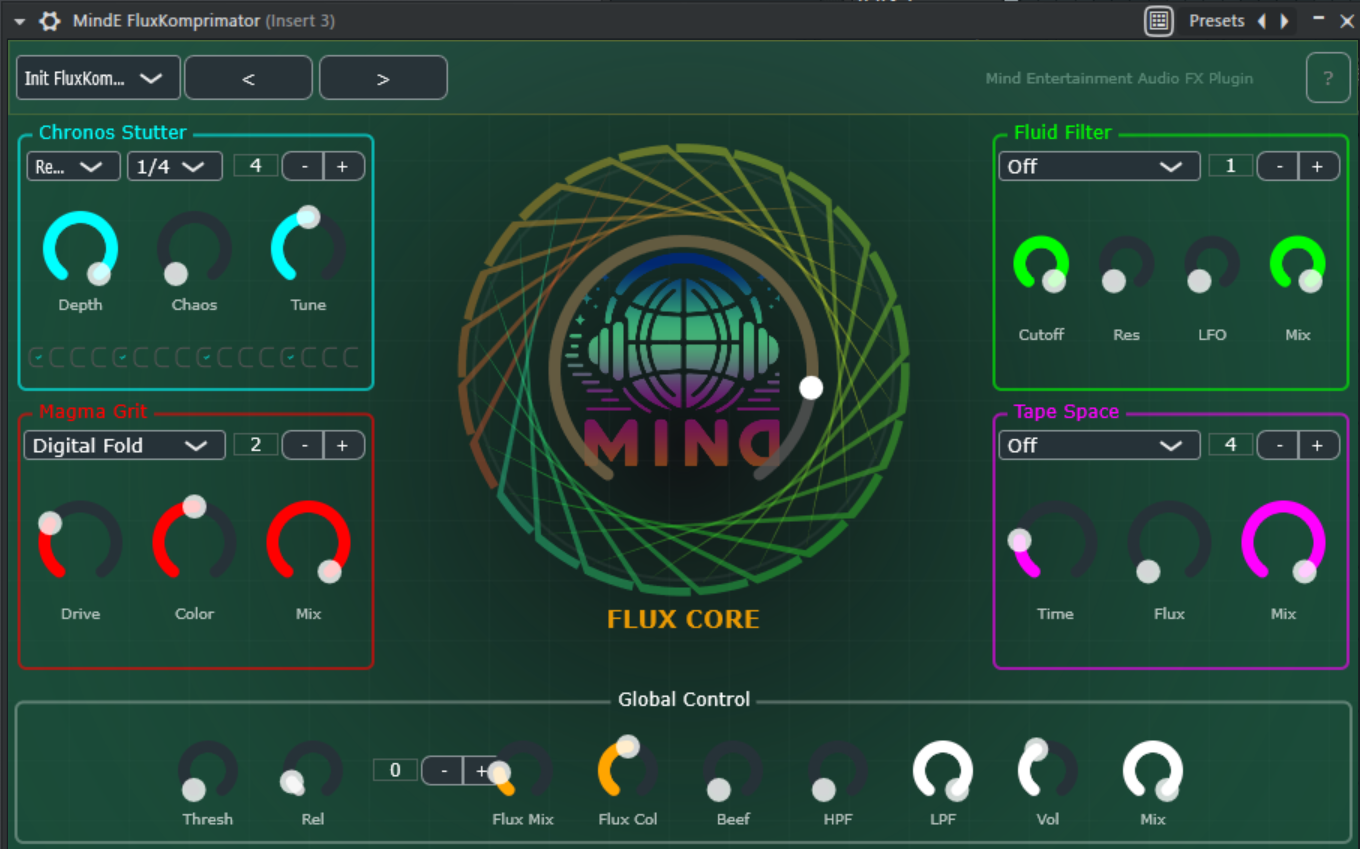
The interface is divided into logical sections:
-
Header: Preset management (30 factory presets) and info button.
-
Center (Flux Core): The main control for modulation depth.
-
Modules (corners): The four main effect areas (Stutter, Grit, Filter, Space) with individual routing options.
-
Footer (Global): Master section, gate, flux settings, and the "Joker" (compressor).
3. The Flux Core (center)
The heart of the plugin is more than just a control. It is a modulation source that affects all other effects.
-
FLUX CORE knob: Determines the global intensity of random modulation ("chaos").
-
0%: The plugin behaves statically and predictably.
-
100%: Maximum modulation.
-
Filter: Drives wild curves (up to ±4 octaves).
-
Space: The tape delay "warps" extremely (up to 30 ms pitch wobble).
-
Grit: The degree of distortion breathes and pulsates.
-
Stutter: The effect depth varies randomly.
-
Visualizer: The turbine in the background shows the current intensity and audio level.
4. The effect modules
Each module has a small number control (Order) in the upper right corner. This determines the position in the signal chain (0 = very beginning, 9 = very end).
A. Chronos Stutter (top left)
A rhythmic gate and glitch sequencer.
-
Mode:
-
Gate: Classic volume gating.
-
Freeze: Freezes the audio and repeats a short fragment (buffer loop).
-
Reverse: Plays fragments backwards.
-
Shuffle: Slightly shifts the timing.
-
Rate: The speed of the grid (1/4, 1/8, 1/16, etc.).
-
Depth: How strong is the effect? (Modulated by Flux).
-
Chaos: Adds random probability that steps will be skipped or changed.
-
Steps (bottom): A 16-step sequencer. Click on the small bars to activate/deactivate steps.
B. Magma Grit (bottom left)
Responsible for dirt, saturation, and distortion.
-
Mode: 10 different algorithms:
-
Tube Warmth, Digital Fold, Bit Decimate
-
Erosion Sine, VHS Noise, Geiger (radioactive crackle)
-
Plasma Drive, Broken Speaker, Quantum Fry (experimental)
-
Drive: Input gain / degree of distortion (modulated by Flux).
-
Color: A tone control that colors the character of the distortion (dark vs. bright).
-
Mix: Mix ratio between clean and distorted signal.
C. Fluid Filter (Top Right)
A filter that can be modulated by the Flux Core.
-
Type: Select the characteristic (LowPass, HighPass, BandPass, Notch, Acid).
-
Cutoff: The base frequency of the filter.
-
Res (Resonance): Emphasis of the frequency.
-
LFO: How strongly should the Flux Core automatically move the cutoff frequency?
-
Mix: Dry/Wet control for the filter effect.
D. Tape Space (bottom right)
Spatial and temporal effects for width and depth.
-
Mode:
-
Tape Wobble: Simulates a warbling tape echo (with saturation in the feedback).
-
Stereo Haas: Delays one channel extremely briefly for extreme stereo width.
-
Dark Room: A dull, short room reverb.
-
Time: Time parameters (delay time or room size).
-
Flux: How much does the effect "wobble" (pitch modulation)? (Amplified by Flux Core).
-
Mix: Dry/Wet control for the space effect.
5. Global Control (footer)
This is where the sound is finalized and the Flux engine is fine-tuned.
-
Gate Thresh: A noise gate to cut out noise during pauses.
-
Gate Rel: How quickly the gate closes (release time).
-
Flux Controls (New):
-
Ord (Order): Determines where the Flux effect itself sits in the chain.
-
Mix: Mixes in the direct modulation effect.
-
Col (Color): Changes the character of the Chaos LFO (slow/drifting -> fast/jittery).
-
Beef: A special multiband compressor (similar to "OTT"). Brings out details.
-
Vol: Master output volume.
-
Mix: Global dry/wet control for the entire plugin.
6. Tips & Tricks
-
The "Breathing" effect: Set the Fluid Filter to LowPass, turn LFO to approx. 40% and Flux Core to 50%. The filter now opens and closes organically.
-
Instant Lo-Fi: Select "VHS Noise" mode for Grit, turn Space to "Tape Wobble" and reduce the sample rate (Grit Drive in Decimate Mode).
-
Lively distortion: Since the Flux Core now also modulates the Grit Drive, you can make static synthesizers "growl" by turning up the Flux Core.
-
Tape Destruction: In the Space module, turn Time to 200-300ms and Flux to 100%. The "wobble" becomes extreme (up to 30ms), which sounds like a broken tape.
7. Installation
-
Copy the .vst3 file to your VST3 folder:
-
Windows: C:\Program Files\Common Files\VST3
-
Mac: /Library/Audio/Plug-Ins/VST3
-
Scan your DAW (FL Studio, Ableton, etc.) for new plugins.
-
Load "MindE FluxKomprimator" onto an audio track.
Enjoy producing!