
MindE CyClone
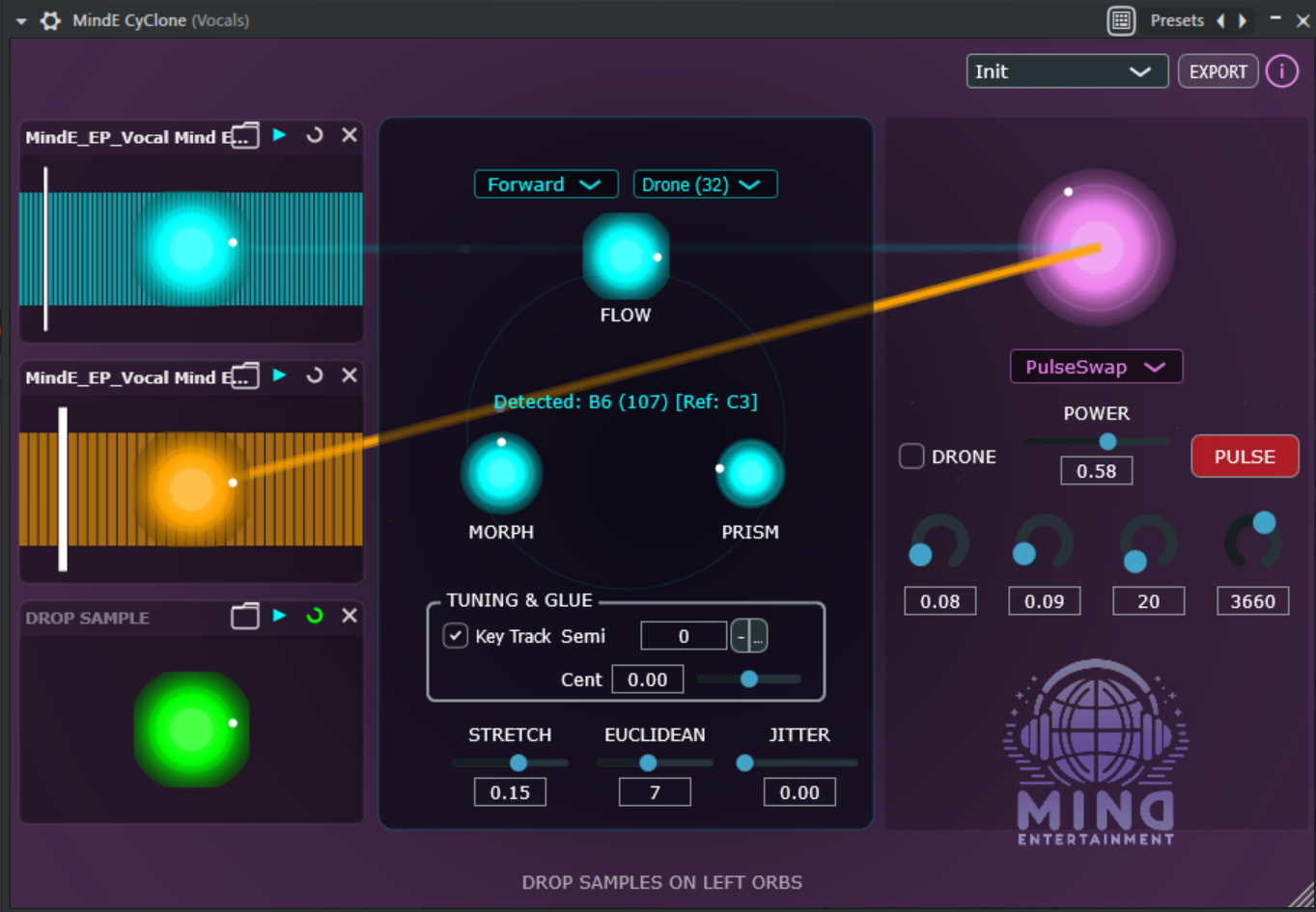
With version 1.6, CyClone positions itself specifically as a Vocal Cycle Engine: a tool that builds layered, cycle-based instruments from raw vocal material - with honest, formant-preserving time-stretch as a reliable foundation and deliberately controllable cross-layer blending as an independent signature feature, instead of automatically mixed layer combinations. CyClone does not aim to be a second Vokkalizer-like pitch-correction tool - its strength lies in cycle-based, granular-like resynthesis over three simultaneous source layers.
Instead of playing a sample linearly, CyClone analyzes the audio material, breaks it down into musically usable cycles, and reassembles them in real-time. The result is an instrument between granular synthesis, resynthesis, and performance sampler: quick to use, visually straightforward, and deep enough for detailed sound sculpting - for vocals as well as for drums, pads, bass, and FX.
SOUND DESIGN FROM THREE LAYERS AND A FUSION REACTOR
At the center of CyClone is the 3+1 architecture:
- Layers 1, 2, and 3 record their own samples.
- Each layer has its own volume, flow, morph, prism, tuning, playback, structure, and cycle-bend parameters.
- The fusion layer accesses the three sources deliberately or automatically and creates new hybrid sounds from them.
Thus, new rhythmic and tonal sound bodies emerge from simple one-shots, vocal fragments, drums, FX, or pads. CyClone is suitable for layered vocal instruments, aggressive bass textures, disassembled drum resynthesis, moving pads, glitch FX, and organic layer sounds.
CYCLE ANALYSIS AND RESYNTHESIS
When loading a sample, CyClone analyzes the material and generates a list of cycles from it. The engine recognizes zero-crossing structures, protects transients at the beginning of the sample, and uses an internal pitch estimation per cycle to make playback and cross-layer blending musically controllable.
Changing the structure setting triggers a new analysis of the respective layer so that playback matches the chosen musical structure.
BLADE INSPECTOR: DIRECT ACCESS TO EACH LAYER
The Blade Inspector makes the three sample layers directly controllable. A click on a layer focuses its parameters. This keeps the interface compact without hiding important adjustments in submenus.
Available per layer:
- Volume: Volume of the layer
- Flow: Cycle density and sense of movement
- Morph: Smoothing, windowing, and shaping of the cycles
- Prism: Stereo width and phase offset
- Key Track: Tonal tracking or fixed sample playback
- Semi: Tuning in semitones from -24 to +24
- Cent: Fine-tuning from -100 to +100 cents
- Play Mode: Forward, Backward, PingPong, Random, Freeze, and Cluster
- Structure: Single, Dual, Buzz, Texture, Drone, Deep, and Eternal
- Stretch: classic time behavior coupling (Shrink/Skip to Stretch/Repeat) with flow, OR via stretch mode switch a dedicated time-stretch %-control (25% to 400% of the original cycle duration, pitch-neutral, independent of flow)
- Cycle Bend: distorts the read position within a cycle for an independent timbre effect (no spectral formant shifting)
- Euclidean: rhythmic cycle progression with up to 16 steps
- Jitter: stochastic variations in cycle progression
- Loop: looped or one-time playback
The stretch control is color-coded: Cyan indicates the classic, flow-coupled control, Violet indicates the dedicated, pitch-neutral time-stretch %-control.
PLAYBACK MODES FOR MOVEMENT AND VARIATION
FUSION PAIRING AND FUSION ALGORITHMS
The fusion layer is more than a summing bus. It connects the loaded samples into new sound forms and visualizes the active source via energy beams in the UI.
Fusion pairing determines which layers are actually mixed: Auto takes over the proven automatic heuristic, while L1+L2, L1+L3, L2+L3, and Round-Robin enforce a fixed, user-selected combination - the excluded third layer remains completely silent in the fusion signal, even if it is loaded and actively playing. In the UI, the two active beams are additionally highlighted, while the excluded layer is visibly dimmed.
Available fusion algorithms:
- Morph: constant energy crossfade between sources
- Vortex: ring modulation-like hybridization
- Subtractive: subtractive interaction and cancellation between sources
- PulseSwap: sequential rotation through the active layers
- Vocal Blend: dedicated switch that aligns the secondary source based on the pitch analyzed per cycle (instead of an arbitrary phase copy) - for cleaner transitions between two differently pitched vocal takes
FACTORY PRESETS
The factory presets are available internally in the plugin via the preset dropdown and are provided by the plugin as host programs so that hosts with program lists can recognize the presets.
The presets should be immediately filled with your own samples. The purpose of the plugin is to make your own samples more exciting.
More information in the folder with the VST3 file in the detailed product description.